


Soup Recipes: Soup Cooking App
4.565.00 Reviews
App Specs
- Version
- 36.1.0
- Updated On
- License
- Free
- Downloads
- 100,000+
- Developer
- Prometheus Interactive LLC
- Categories
- Food & Drink
- Platform
- Android
Screenshots
 Analysis by AppCompare
When I’m deciding whether a cooking app deserves a place on my phone, I look past the recipe count and ask a simpler question: will it help me make a useful meal with what I have, without turning dinner into a project? Soup Recipes: Soup Cooking App is aimed at that everyday job. It is a free Food & Drink app from Prometheus Interactive LLC, and its focus on soup makes it more specific than a general recipe browser. I’d consider it most useful when I want inspiration for a pot of something warm, rather than a complete guide to every kind of cooking.
What the free price does—and doesn’t—tell you
You can get started without paying upfront, which makes it easy to try the app before deciding whether it suits your cooking habits. The listing also notes optional in-app purchases ranging from $0.99 to $99.99 per item. That is a broad span, so I would not assume every purchase is necessary—or that a particular paid feature is included—without checking the purchase details in the app. The sensible approach is to explore the free experience first and spend only if an option clearly solves a problem for you.
That distinction matters for a recipe app. A free download can still be useful if it gives you ideas you can cook from, while optional purchases may or may not add enough value for your needs. I’d treat the price as a low-commitment invitation to try it, not as proof that every feature is free. It is rated for Everyone, and the app has a 4.5 average from around 837 ratings, but neither a rating nor an age label tells me whether a specific recipe fits my pantry, diet, or cooking skill.
Where a soup-focused app can earn its place
Soup is a practical format for using up a mix of ingredients, and a dedicated recipe collection can help when the fridge contains odds and ends that do not suggest an obvious meal. Instead of searching broad recipe sites and filtering past unrelated dishes, I can start with the kind of food I already want to make. That narrower focus is the app’s clearest potential advantage over a general-purpose cooking app: it reduces the distance between “I want soup” and finding a direction for dinner.
A useful way to browse is to decide what you need the recipe to do before opening the collection. If the goal is to use vegetables before they soften, look for a recipe that seems adaptable and treat its ingredient list as a starting point. If I’m cooking for someone who avoids a particular ingredient, I would check the full recipe rather than assume a category or suggestion makes it suitable. A recipe can inspire a substitution, but the cook still needs to judge whether the change affects seasoning, texture, or cooking time.
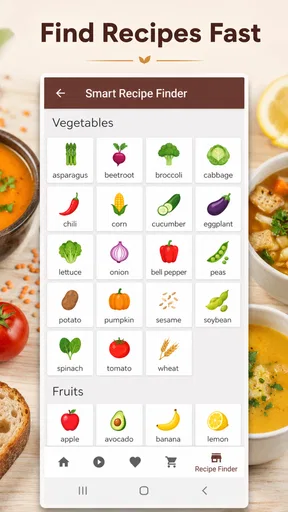
For a realistic weeknight, imagine getting home with carrots, a few vegetables, and broth, but no fixed dinner plan. I’d use a soup recipe to choose a flavor direction, check whether the ingredients are close to what I have, and make a short list of anything missing before heading out. That workflow is more helpful than saving several attractive recipes and hoping one matches the cupboard. Soup is forgiving in some ways, but a recipe still needs enough structure to keep the result balanced.
How I’d use recipes without following them blindly
Recipe directions work best as a sequence, not just a list to skim. Before starting, I’d read the whole method and check whether anything needs preparation before the pot goes on the stove. That small habit helps avoid discovering halfway through that an ingredient should have been chopped or added earlier. I’d also group ingredients on the counter by when they go into the pot; with soups, the order can affect how much texture survives by the end.
Worth Reading Before You Choose

EA SPORTS FC Mobile 26 Is a Bigger Football Game, but It Takes Time

Flipboard Shows What News Apps Must Do Beyond the Feed

Switching to Android Auto Means Rethinking Your Driving Routine

Google Calendar Makes a Crowded Week Easier to Manage

Ludo King Makes the Most of the Minutes Between Plans

Baby Panda World Brings Quick Play to Modern Phones, but Its Game Library Feels Busy
If I were adapting a recipe, I’d change one major element at a time. Swapping a vegetable is usually easier to judge than changing several ingredients and the seasoning together. When using a substitution, I’d taste near the end and adjust gradually rather than adding extra salt or spice at the beginning. This is a practical way to make a recipe fit what is on hand while still learning which changes improve it. The app can provide ideas, but it cannot taste the pot for you.
Offline access is part of the app’s appeal, especially for someone who wants to refer to recipes without relying on a live connection while cooking. I’d still open a recipe before leaving home or beginning prep, so I know what it calls for and can check that it is available offline in the way I need. That is a useful precaution for any cooking workflow: do not wait until your hands are messy to find out whether the instructions you want are accessible.
Choosing it over broader recipe alternatives
A general recipe app or a web search is usually better when I need a very specific dietary filter, a precise nutrition breakdown, or a dish outside the soup category. A dedicated soup app has a different strength: it keeps the browsing centered on one kind of meal. That focus can make inspiration feel less scattered, but it also means it should not replace a broad recipe library if I want help planning every meal of the week.
Compared with a printed cookbook, a phone-based collection is easier to browse while shopping or cooking, though a book can be more comfortable to leave open on the counter. Compared with searching the web, an app may offer a more contained experience, but I would still check recipe details carefully rather than assume every result is equally suited to my needs. My choice would depend on the moment: this app for soup ideas, a broader source for meal planning across several cuisines and courses, and a trusted cookbook when I want a familiar recipe without screen distractions.
The app has more than 100K installs, which suggests it has found an audience, but popularity is not a substitute for checking whether the recipes match your tastes. It was released on October 21, 2016, and the current version is 36.1.0, with Android 8.0 as the minimum operating system. Those details may help with basic compatibility decisions, but the real test is whether you enjoy the selection and can use the instructions comfortably on your own device.
Who is likely to get the most value?
I’d point this app toward new cooks who want a focused place to look for soup inspiration, people who make soup regularly, and anyone who likes having a few reliable ideas for using vegetables or pantry staples. It may also suit someone who wants to build confidence by following step-by-step recipes before improvising. If you cook for a household with varied preferences, a soup collection can be a helpful starting point, but you should inspect each recipe for ingredients that need to be avoided or adjusted.
I would skip it as my main cooking resource if I rarely make soup, need detailed nutritional planning, or depend on strict allergy controls and verified dietary filters. In those cases, a specialist nutrition tool, a recipe source with the exact filters you need, or guidance from a qualified professional is a better fit. Likewise, cooks who already have a dependable collection of soup recipes may not gain much from another place to browse unless its particular range gives them fresh ideas.
One question worth answering before relying on it is whether it works for the way you actually cook: do you need to browse offline, save favorites, or build a shopping list? The published description presents the app as an offline soup resource, while individual tools and purchase details should be checked directly in the app before you plan around them. I’d test the basic routine with one recipe first—find it, check the ingredients, and follow the method—before making it part of a weekly system.
Another practical question is whether a recipe can be made with substitutions. I’d use the listed ingredients and directions as the dependable starting point, then make sensible adjustments only when I understand what each ingredient contributes. If a dish depends on a specific flavor or texture, replacing several components may produce something quite different. For a first attempt, it is usually better to follow the recipe closely; once I know how it turns out, I can adapt it with more confidence.
Discovering New Flavors
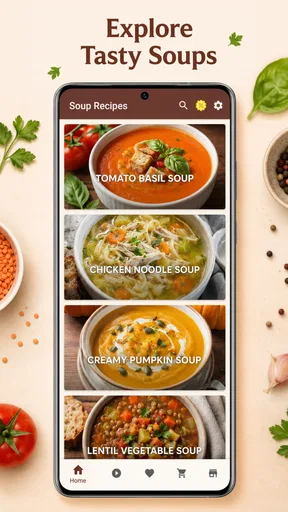
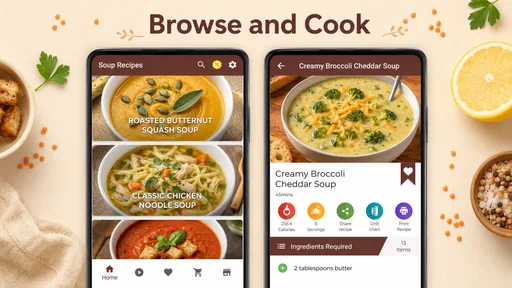
One of the first things that caught my eye about the Soup Recipes: Soup Cooking App is its vast collection of recipes. Whether you're in the mood for something traditional like a classic chicken noodle or craving an exotic Thai coconut soup, this app has you covered. The recipes are neatly organized into categories, making it super easy to find exactly what you're looking for. Plus, each recipe comes with a beautiful photo that gives you a sneak peek of what your finished dish should look like.
Easy-to-Follow Instructions
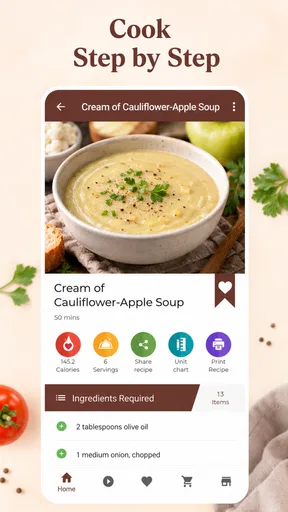
Now, I'm no professional chef, but I found the instructions in this app to be incredibly straightforward. Each recipe is broken down into simple steps, with clear directions and ingredient lists. This makes it a breeze to follow along, even if you're juggling a busy schedule. And for those of us who might need a little extra help, some recipes include video tutorials. Trust me, it's like having a personal chef guiding you through the process!
Customization Options
One of my favorite features of the Soup Recipes app is the ability to customize recipes to suit your taste or dietary needs. Whether you're vegan, gluten-free, or just trying to cut back on salt, the app provides suggestions and substitutions to help you modify the recipes without sacrificing flavor. It's like having a recipe whisperer right in your pocket!
Community and Sharing
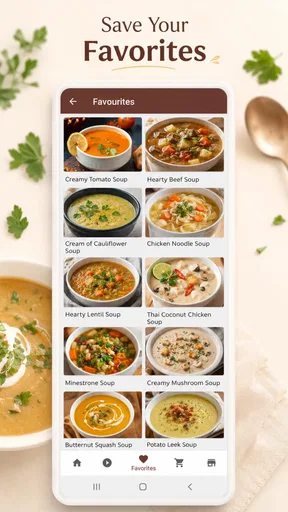
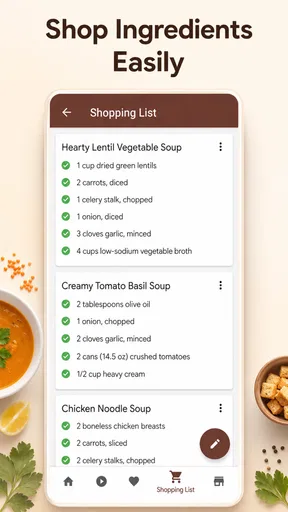
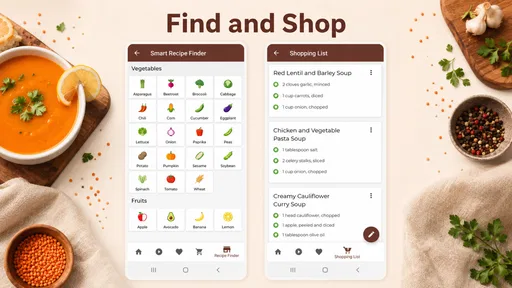
Cooking is always more fun when you can share your creations with others, and this app makes it easy to do just that. You can save your favorite recipes, create shopping lists, and even share your culinary masterpieces on social media. Plus, there's a community feature where you can connect with other soup enthusiasts, swap tips, and even share your own recipe creations.
Staying Organized
For those of us who love to stay organized, the app offers a handy meal planner. You can plan your weekly meals, track your ingredients, and avoid the dreaded "what's for dinner" dilemma. It's a fantastic way to make sure you're using up all those veggies in the fridge before they go bad.
Final Thoughts
So, would I recommend the Soup Recipes: Soup Cooking App? Absolutely! Whether you're a seasoned pro in the kitchen or just starting out, this app offers something for everyone. It's user-friendly, packed with delicious recipes, and offers a delightful community experience. So go ahead, download the app, and let the soup-cooking adventures begin. Happy cooking!
Pros
- Wide variety of soup recipes available.
- Easy-to-follow step-by-step instructions.
- User-friendly interface and navigation.
- Offline access to saved recipes.
- Nutritional info provided for each recipe.
Cons
- Limited customization options for recipes.
- Ads can be intrusive at times.
- Requires internet for new recipes.
- No video tutorials available.
- Limited dietary preference filters.
FAQs for Soup Recipes: Soup Cooking App
What features does the Soup Recipes: Soup Cooking App offer?
The Soup Recipes: Soup Cooking App provides a wide range of features, including step-by-step instructions for various soup recipes, ingredient lists, cooking tips, and nutritional information. Users can also save their favorite recipes, create shopping lists, and access daily cooking tips to enhance their culinary skills.
Is Soup Recipes: Soup Cooking App free to use?
Yes, the app is free to download and use. However, it may offer in-app purchases or a premium version with additional features such as exclusive recipes, ad-free browsing, and personalized meal plans. It's wise to check the app details in the store for any costs associated with premium features.
Can I use Soup Recipes: Soup Cooking App offline?
The app requires an internet connection for initial download and updates. However, once recipes are saved to your favorites, you can access them offline. This feature is convenient for users who want to cook without worrying about connectivity issues in the kitchen.
Are there vegetarian or vegan options available in the app?
Absolutely! The Soup Recipes: Soup Cooking App includes a diverse range of recipes, catering to various dietary preferences and restrictions. Users can easily filter recipes to find vegetarian, vegan, gluten-free, or other specific types of soups, ensuring everyone can enjoy delicious homemade dishes.
How often does the app update its recipe collection?
The app regularly updates its recipe collection to provide fresh and seasonal options. Users can expect new recipes to be added monthly, along with seasonal specials and trending soups. These updates help keep the content engaging and aligned with current culinary trends.


